Self-Service Terminal Accessibility Under the EAA: What Banks, Retailers, and Transport Operators Must Do Now
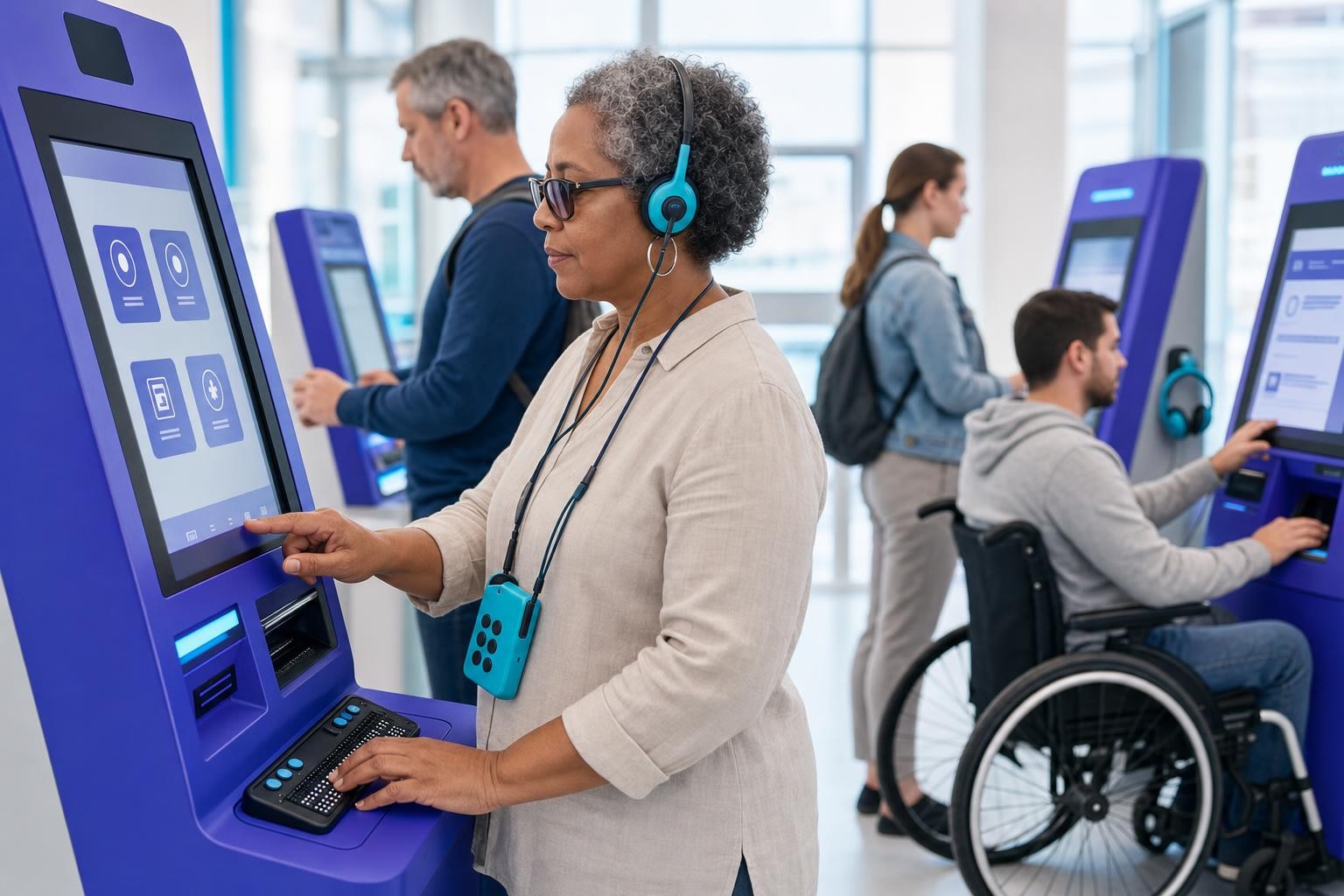
Most EAA compliance conversations start and end with websites. That's understandable - web and app accessibility is measurable, tooling is mature, and the WCAG checklist is well-known. But there is a whole category of in-scope products that procurement teams, facilities managers, and OEMs are still overlooking: the physical self-service terminals deployed in bank branches, train stations, car parks, airports, and retail floors across the EU.
This post is specifically about that hardware layer. If you want WCAG guidance for your website or app, we have a full EAA overview and an EN 301 549 explainer for that. Here, we focus on the terminals themselves.
Which terminals does the EAA actually cover?
The EAA (Directive (EU) 2019/882) explicitly names self-service terminals as in-scope products. These include ATMs, point-of-sale systems, ticketing machines, and information kiosks that enable consumer purchases or provide access to covered services.
The practical scope is broader than many teams realise. If a kiosk is used as an ATM, ticketing, check-in, banking, transport, or e-commerce interface, it falls within the scope of EAA-covered products and services, even if the word "kiosk" is not used. That means:
- Bank ATMs and cash-recycling machines
- Payment terminals at retail counters and self-checkout lanes
- Train, bus, and metro ticketing machines
- Airport check-in and bag-drop kiosks
- Parking and EV charging payment terminals
- Interactive information screens tied to a covered transport or banking service
The key test is whether the terminal delivers a service that is itself in scope - banking, transport ticketing, e-commerce, or electronic communications. If it does, both the terminal (as a product) and the service it delivers are subject to the EAA's accessibility requirements.
The product and the service are both in scope. A ticketing machine is a product — but it also delivers a transport ticketing service. Both layers must be accessible, and your accessibility statement must describe how each meets the requirements. See our accessibility statement guide for what to include.
The transition rule: what the 20-year window really means
The EAA has applied since 28 June 2025. For most products and services, that is the compliance date. But self-service terminals have a specific transitional provision in Article 32(2) of the Directive.
Member States may provide that self-service terminals lawfully used by service providers for the provision of services before 28 June 2025 may continue to be used in the provision of similar services until the end of their economically useful life, but no longer than 20 years after their entry into use.
In plain terms: a self-service terminal installed before 28 June 2025 may remain in service until it reaches the end of its economic life, subject to a hard cap of 20 years from the date it was first put into use - meaning no terminal is exempt beyond 28 June 2045 at the latest.
Long-life self-service terminals installed before 2025 do not have to be replaced until either they reach the end of their economic life, or 28 June 2045.
What this means in practice
This is not a blanket exemption. It has three important limits:
New and replacement terminals must comply from day one. Anything new - from hardware design to software interface - must be accessible to people with disabilities from day one. If you replace a non-compliant machine, the replacement must meet EN 301 549 requirements immediately.
Software updates on existing machines are not fully exempt. The next time a physical machine is replaced, the new version must conform with accessibility requirements. If a new release of the software is made for the machine, it needs to be accessible in the ways that it is possible.
The clock runs from installation, not from 2025. A terminal installed in 2010 has its 20-year window expiring in 2030, not 2045. You need to know your fleet's installation dates to apply this rule correctly.
The technical standard: EN 301 549 and the "closed functionality" problem
Following EN 301 549 creates a "presumption of conformity" with the EAA - meaning regulators will presume your products meet legal requirements if you comply with the standard. For hardware terminals, the relevant chapters are primarily Chapter 5 (generic requirements, including closed functionality and biometrics) and Chapter 8 (hardware-specific physical requirements).
The concept of closed functionality is central to terminal compliance. Open functionality refers to systems that allow users to install and use their own assistive technologies. Closed functionality refers to systems that do not allow this, requiring accessibility features to be built directly into the product, such as in kiosks or terminals.
This is the fundamental difference between a terminal and a website. A blind user visiting your website can bring their own screen reader. A blind user at your ATM cannot install anything - so the machine itself must provide the equivalent. Closed and partially closed systems need to provide ways for all users to be able to access the system in the absence of supplemental assistive technology. For example, a user is not able to install or use their own screen reader onto a bank machine or a ticket kiosk at the airport. Therefore, some form of speech output must be provided for those users.
What EN 301 549 actually requires from terminals
Here is a breakdown of the concrete hardware and interface requirements that apply to self-service terminals under EN 301 549 v3.2.1.
Audio and speech output
Audio output should not compromise the user's privacy, outputting personal information only to private listening devices, and auditorily masking content that is visually masked, such as password entry forms. This is why a headphone jack is not optional - it is the mechanism for delivering private speech output to blind users.
Where ICT hardware has speech output, it shall provide a means to adjust the speech output volume level over a range of at least 18 dB.
Self-service terminals requiring a timed response must alert the user of the timing in multiple sensory channels. Visual countdowns alone are not sufficient - auditory alerts are required.
Tactile controls and keypads
Hardware that provides numeric keypads must arrange them in the standard telephone order, with the number 5 in the centre and distinguishable by tactile means (such as a raised dot).
The tool must have a mode in which the user can operate controls without using grasping, pinching, or twisting motions. Where a control requires a force greater than 22.2 N to operate it, an accessible alternative means of operation that requires a force less than 22.2 N shall be provided.
Shared-use devices, such as ticketing and information terminals, that can output speech should provide a tactile means for users to activate the speech mode.
Physical reach and positioning
Stationary ICT, such as information and ticketing terminals, must have an accessible approach in order for a person to use the technology. The standard allows either an accessible forward approach or an accessible side approach, with specific dimensions defining each. It also requires that the device be mounted so there is knee and toe clearance for users in wheelchairs.
Where no part of the stationary ICT obstructs the forward reach, at least one of each type of operable part shall be located no higher than 1,220 mm above the floor of the access space, and no lower than 380 mm above the floor of the access space.
Visual display requirements
EN 301 549 Chapter 8 includes requirements like having interactive elements at a height between 38-122 cm; when the product uses visual elements it shall provide for flexible magnification, brightness and contrast. Where a terminal cannot support dynamic text enlargement, the standard sets minimum character height requirements based on viewing distance.
Multi-sensory communication
When the product provides for communication, including interpersonal communication, operation, information, control and orientation, it shall do so via more than one sensory channel. A terminal that communicates only through a visual display - with no audio alternative - does not meet this requirement.
Biometrics
EN 301 549 Chapter 5 addresses biometrics directly. Where a terminal uses biometric authentication (fingerprint, facial recognition, iris scan), a non-biometric alternative must be available. Not every user can provide a biometric - and requiring one as the only option excludes users with certain disabilities.
For OEMs and integrators: EN 301 549 v3.2.1 is the current version. A draft v4.1.1 is expected to publish in 2026 and will be harmonised with the EAA, providing formal presumption of conformity. Build to v3.2.1 now and monitor the v4.1.1 publication — the hardware chapter structure is not expected to change fundamentally, but the harmonisation will sharpen the legal link.
The feature checklist for new terminals
Use this as a starting point for procurement RFPs and hardware acceptance testing. It is not exhaustive - work directly with EN 301 549 and a qualified accessibility specialist for formal conformance.
| Feature | Requirement | EN 301 549 Ref |
|---|---|---|
| Speech output | Full transaction narration via built-in speaker and headphone jack; private output for sensitive data | Ch. 5, 8 |
| Volume control | Adjustable over at least 18 dB range; at least one intermediate step of 12 dB gain | 8.2.1 |
| Tactile keypad | Numeric keys in standard telephone layout; raised dot on '5'; tactile differentiation of all keys | 8.4.1 |
| Speech mode activation | Tactile indicator (e.g. raised symbol or braille) to locate and activate speech mode without vision | 8.4.2 |
| No simultaneous actions | All functions operable with single-point input; no requirement for simultaneous key presses | 5.9 |
| No fine motor requirement | Controls operable without grasping, pinching, or twisting; operating force ≤ 22.2 N | 8.4.3 |
| Reachable height | Operable parts between 380 mm and 1,220 mm from floor; knee/toe clearance for wheelchair users | 8.3 |
| Multi-sensory alerts | Timed responses and alerts communicated via both visual and auditory channels | 5.1.3 |
| High contrast and magnification | Flexible brightness/contrast controls; or minimum character height per viewing distance if fixed | 8.1.3 |
| Colour not sole indicator | Information not conveyed by colour alone; shape, text, or pattern used alongside colour | 5 / Ch. 11 |
| Biometric alternative | Non-biometric authentication option available where biometrics are used | 5.3 |
| Timeout extension | User warned of timeout via multiple sensory channels; option to extend or disable time limit | 5.1.3 |
| Keys, tickets, fare cards | Orientation tactilely discernible where orientation matters for further use | 8.4.4 |
| Accessible instructions | On-screen and printed instructions available in accessible formats; support documentation accessible | Ch. 12 |
Enforcement: what is actually happening in 2026
The primary EAA deadline was 28 June 2025, when accessibility requirements became applicable to new products and newly published digital content. Enforcement is expected to intensify across EU countries during 2026 as monitoring authorities ramp up their auditing and enforcement efforts.
Each EU member state is responsible for enforcing the EAA, and penalties for non-compliance vary by country. The picture as of June 2026:
- France: On July 7, 2025, French disability organisations sent formal legal notices to Auchan, Carrefour, E.Leclerc, and Picard Surgelés. When responses proved inadequate, emergency injunctions were filed in French Commercial Court on November 12, 2025, marking the first EAA-related lawsuits in Europe.
- Sweden: The PTS has received 124 public complaints - 110 concerning services, predominantly e-retail websites, and 14 concerning products such as ATMs. Hardware is already in the complaints pipeline.
- Germany: Starting in June 2025, businesses may face fines of up to €100,000 for selling products and services that are non-compliant with accessibility regulations. Germany also has the Abmahnung system, where competitors can file civil claims for unfair competition based on accessibility non-compliance.
- Spain: Spain has the steepest confirmed penalties in the EU. Fines are tiered: minor infractions range from €301 to €30,000, serious infractions from €30,001 to €90,000, and very serious infractions from €90,001 to €1,000,000. Authorities can also suspend business activity for up to three years.
- Netherlands: The Dutch Consumer and Market Authority (ACM) allowed voluntary self-reporting until October 15, 2025, after which reporting became mandatory. The ACM has since sent information requests to e-commerce operators worldwide - including companies headquartered outside the EU. Organisations that did not respond are now under active monitoring, with formal enforcement expected in the second half of 2026.
Authorities may order non-compliant products to be removed from the market, and economic operators may face penalties under the national laws that implement the directive. For a terminal operator, market withdrawal means the machine stops being usable to provide the service - a significant operational consequence beyond any fine.
Practical steps for terminal operators and procurement teams
1. Inventory your fleet with installation dates
Apply the 20-year rule to every terminal in your estate. A machine installed in 2008 has a hard deadline of 2028 - not 2045. Build a register that captures: terminal type, location, installation date, calculated EAA deadline, and current conformance status.
2. Require EN 301 549 conformance in all new procurement
Accessibility must be built into the kiosk from the beginning - which means your procurement process needs to demand it upfront from your supply chain. Whether you're issuing an RFP or working through preferred vendors, make accessibility a core requirement alongside functionality, security, and cost.
Ask vendors for an Accessibility Conformance Report (ACR) based on the VPAT template, scoped to EN 301 549 Chapter 8 and Chapter 5. Verify claims through independent evaluation - do not accept self-declaration alone.
3. Retrofit interface software where possible
The transition rule covers the hardware, but software updates on existing machines must be accessible where technically feasible. Accessibility reviews of software interface updates before launch help identify emerging issues, giving you an opportunity to address them before they're pushed to the kiosks.
4. Document accessibility features in your accessibility statement
The EAA requires an accessibility statement that covers both the service and the products used to deliver it. For terminal-based services, this means describing the accessibility features of the terminals themselves - speech output availability, headphone jack location, tactile keypad, timeout extension options - so users know what to expect before they arrive at the machine. See our accessibility statement guide for the full requirements.
5. Test with disabled users
Regular testing, including with people with disabilities, is essential to ensure that all accessibility features work as expected and to identify any regressions. A tactile keypad that passes a spec sheet check may still be unusable in practice. Real-world testing with blind users, wheelchair users, and users with limited dexterity is the only way to know.
The transition timeline at a glance
| Date | What it means for terminals |
|---|---|
| 28 June 2025 | EAA in force. All new terminals placed on the market must comply with EN 301 549. |
| 28 June 2027 | Emergency services deadline (separate provision). |
| 28 June 2030 | General transitional period ends for products used in service delivery. |
| Up to 28 June 2045 | Hard cap on the 20-year self-service terminal exemption. Terminals installed before June 2025 must be compliant or decommissioned by this date at the latest - earlier if their economic life ends sooner. |
The bottom line
The EAA's hardware provisions are not a future concern - they are in force now, and enforcement is building. The 20-year transition rule is a genuine grace period for legacy fleets, but it is not a reason to delay planning. Every new terminal you procure today must be compliant. Every software update you push to an existing machine should be as accessible as the hardware allows. And your fleet register needs installation dates, not just asset numbers.
The teams that will find this easiest are those that treat EN 301 549 Chapter 8 as a procurement standard, not a retrofit problem. Build the checklist into your RFP template, require ACRs from vendors, and test with real users. The standard is outcome-based - it tells you what users must be able to do, not exactly how to build it. That gives hardware designers flexibility, but it also means there is no shortcut: the machine either works for a blind user, a wheelchair user, and a user with limited dexterity, or it does not.
Related reading
Accessible Payment Authentication and Identity Checks: 3-D Secure, SCA and KYC Flows Under the EAA
Strong customer authentication and ID verification are where accessible checkout and onboarding quietly break: SMS codes, smartphone-only approvals, selfie capture and timed steps. How the EAA, WCAG 2.2 and SCA fit together, and how to offer methods that do not depend on one device or ability.
WCAG 2.5.8 Target Size (Minimum): The 24px Rule, Its Five Exceptions, and the Dragging Fix Most Teams Skip
WCAG 2.2 added a 24 by 24 CSS pixel minimum for pointer targets and a single-pointer alternative for dragging. What 2.5.8 and 2.5.7 require, how the exceptions work, CSS patterns that pass, and how to apply the thresholds on iOS and Android.
Chatbot and AI Assistant Accessibility Under the EAA: Streaming Replies, Focus Management and the Widget Nobody Tested
Chat widgets and AI assistants sit inside checkout, banking and support flows the EAA covers, yet streaming responses, focus handling and launcher buttons routinely fail screen reader and keyboard users. What WCAG AA requires, how EU AI Act transparency duties interact, and a build-and-test checklist.